History: RT Shader System
Preview of version: 10
- «
- »
Table of contents
Motivation
Writing shading programs became a very common task when developing 3D based application during the last couple of years.
Most of the visual effects used by 3D based applications involve shader programs.
Here is just a short list of some common effects using shaders
- Hardware animation
- Soft shadows
- Normal/Bump maps
- Specular maps
- Advanced multi-texturing effects
Writing shaders by hand is in many cases the best solution as one has the full control of the shader code, optimizations based on the target scene nature can take place etc.
So why use a runtime shader system anyway?
- Save development time e.g. when your target scene has dynamic lights and the number changes, fog changes, ... and the number of material attributes increases the total count of needed shaders dramatically. It can easily cross 100 and it becomes a time consuming development task.
- Reusable code - once you've written the shader extension you can use it anywhere due to its independent nature.
- Custom shaders extension library - enjoy the shared library of effects created by the community. Unlike hand written shader code, which may require many adjustments to be plugged into your own shader code, using the extensions library requires minimum changes.
Core features of the system
- Runtime shader generation synchronized with scene state. Each time scene settings changes a new set of shaders is generated.
- Full FFP (Fixed Function Pipeline) emulation. This feature is most useful combined with render system that doesn't provide any FFP functionality (OpenGL ES 2.0, D3D10, D3D11 etc).
- Shader language independent interface: the logic representation of the shader programs is completely independent from the target shader language. You can generate code for different shader languages from the same program.
- Pluggable interface allows extending the target shader languages set.
- Pluggable interface allows adding new shader based effect to the system in seamless way. Each effect code will be automatically combined with the rest of shader code.
- Smart program management: each shader program is created only once and may be used by multiple passes.
- Automatic vertex shader compacting mechanism: no more compacting variables by hand. In case the amount of used vertex shader output registers exceeds the maximum allowed (12 to 32, depending on D3DPSHADERCAPS2_0.NumTemps), a compacting algorithm packs the vertex shader outputs and adds unpack code in the fragment shader side.
- Material script support, for both export and import.
High level system overview
The main interface that will be used by users is the ShaderGenerator.
This singleton provides most of the services needed to generate shaders on the fly.
It let the user control the target shader code language (Cg, HLSL & GLSL), define the target profiles and of course generating shaders for a given material technique.
When the user asks the system to generate shaders for a given technique it has to provide the system a name for the target technique scheme. The system in turn, creates new technique based on the source technique but with different scheme name.
Note: In order to avoid clashes the source technique must NOT contain any shaders otherwise this step will fail.
The idea behind this concept is to use Ogre built in mechanism of material schemes – so all the user has to do in order to use the new technique is to change the material scheme of his viewport(s).
Before each viewport update the system perform validation step of all associated shader based techniques it created.
This step includes automatic synchronization with the scene lights and fog states.
When the system detects that the scheme is out of date it generates the appropriate shaders for each technique.
The following steps are taken in order to generate shaders for a given technique.
- For each pass in the technique the system builds a set of sub render states that describes the logic process of rendering pipeline from the draw call submission until the final pixel color.
- Each render state is translated to set of logic shader programs – currently only pixel and vertex shader.
The logic programs are then sent to specific shader language writer that produce source code in its shader language. The source code is used to create the GPU programs that are applied to the destination pass.
Before rendering of an object that uses generated shaders the system allow each sub render state compose it to update the GPU constants associated with it.
In fact, the FFP emulation as well as the common shader based effects implemented use this methodology, meaning they override the SubRenderState and the SubRenderStateFactory.
The FFP emulation contains the following SubRenderState overrides:
- FFPTransform: responsible for vertex transformation.
- FFPColour: responsible for colour registers.
- FFPLighting: responsible for lighting calculations.
- FFPTexturing: responsible for texture layers blending.
- FFPFo: responsible for fog effect.
Initializing the system
Initializing the system composed of the following steps:
- Create the internal managers and structures via the Ogre::RTShader::initialize() method.
- Set the target cache path. This is the place on disk where the output shaders will be written to or will be read from in case they were generated by previous runs of your application.
- Verify that the location of the shader libs needed by the system added to the ResourceGroupManager via the ResourceGroupManager::addResourceLocation method.
- Assign the target scene manager to the shader generator.
if (Ogre::RTShader::ShaderGenerator::initialize())
{

// Grab the shader generator pointer.
mShaderGenerator = Ogre::RTShader::ShaderGenerator::getSingletonPtr();

// Add the shader libs resource location.
Ogre::ResourceGroupManager::getSingleton().addResourceLocation(shaderLibPath, "FileSystem");

// Set shader cache path.
mShaderGenerator->setShaderCachePath(shaderCachePath);

// Set the scene manager.
mShaderGenerator->addSceneManager(sceneMgr);

return true;
}
Creating shader based technique
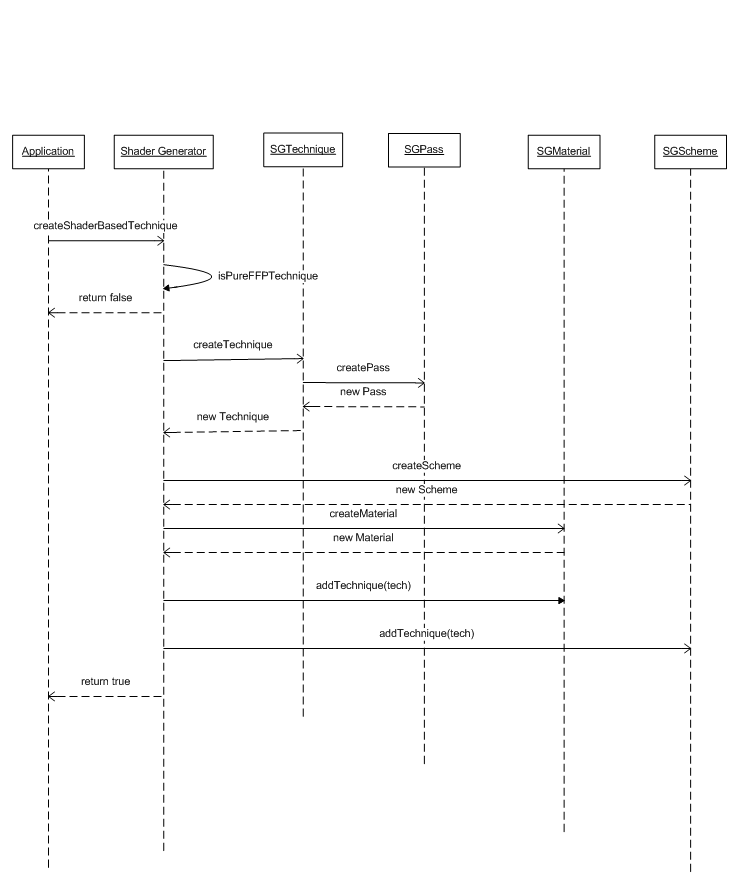
This step will associate the given technique with a destination shader generated based technique. Calling the ShaderGenerator::createShaderBasedTechnique will cause the system to generate internal data structures associated with the source technique and will add new technique to the source material. This new technique will have a scheme name that passed as an argument to this method and all its passes will contain shaders that the system will generate and update during the application runtime.
Once you created such a technique all you have to do in order to use it is to change the material scheme of your viewport(s) to the same scheme name you passed as argument to this method.
// Create shader based technique from the default technique of the given material.
mShaderGenerator->createShaderBasedTechnique("Examples/BeachStones", Ogre::MaterialManager::DEFAULT_SCHEME_NAME, Ogre::RTShader::ShaderGenerator::DEFAULT_SCHEME_NAME);

// Apply the shader generated based techniques.
mViewport->setMaterialScheme(Ogre::RTShader::ShaderGenerator::DEFAULT_SCHEME_NAME);
Runtime shader generation
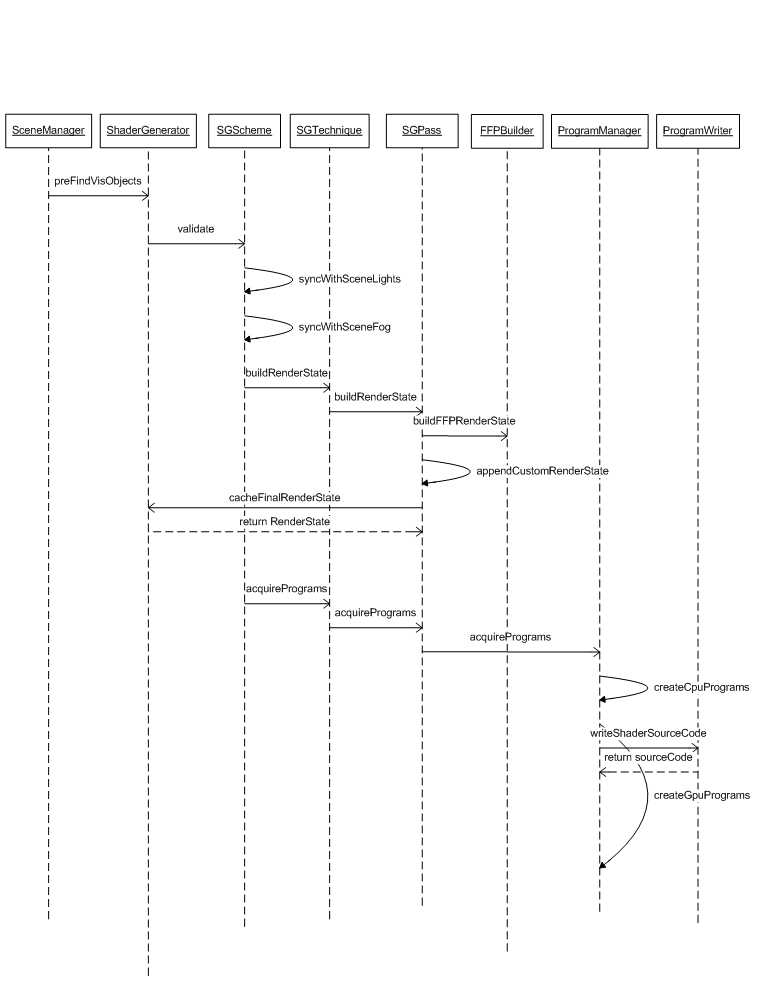
During the application runtime the ShaderGenerator instance receives notification on per frame basis from the it's target SceneManager.
At this point he checks the material scheme in use. In case the current scheme has representation at the manager he executes its validate method.
The SGScheme validation includes synchronization with scene light and fog settings.
In case it is out of date it will rebuild all shader generated techniques.
The first step is to loop over every SGTechnique associated with this SGScheme and build its RenderStates - one for each pass. Each RenderState has its own hash code and it is cached at the ShaderGenerator. The same RenderState can be shared by multiple SGPasses.
The second step is to loop again on every SGTechnique and acquire a program set for each SGPass. The actual acquiring process is done by the ProgramManager that generates CPU program representation, send them to a matching ProgramWriter that is chosen by the active target language, the writer generates source code that is the basis for the GPU programs.
The result of this entire process is that each technique associated with the SGScheme has vertex and pixel shaders applied to all its passes. These shaders are synchronized with scene lights and fog settings.
Creating custom shader s extensions
Although the system implements some common shader based effects such as per pixel lighting, normal map etc one may find it useful to write its own shader extensions.
In order to extend the system with your own shader effects you'll have to follow these steps -
- Implement the SubRenderState interface – this is the main class that responsible for the actual effect processing such as preparing the destination pass, updating the CPU shader programs, updating the GPU shader parameters etc.
- Implement the SubRenderStateFactory interface: This class will allow the RTSS to create instances of the previous class via code or script as well as export it to material script file.
- Register the factory to the RTSS using the ShaderGenerator::addSubRenderStateFactory method.
- Add shader files that will supply all the actual shader functions your SubRenderState needs. In order to support multiple shader languages you should supply code for your entire desired target shading languages (CG, HLSL, GLSL etc). These files should be placed in a way that the resource manager could access them. This can be done by placing them in a valid resource location or by dynamically adding resource location.
Implementing the SubRenderState requires overriding the pure methods of the base class.
- SubRenderState::getType() should return unique string that identify the sub class implementation. That value is shared among all instances and can be stored in a static string variable. It uses to system to match between SubRenderState instance and the factory to should destroy it.
- SubRenderState::getExecutionOrder() should return integer value that will use the system to sort all SubRenderState instances of the same render state before each one of them will create its part in the CPU shader programs.
- SubRenderState::getHashCode() should return unsigned integer value that will represent the actual shader code it will generate. The first thing one should include in the hash code generation is the hash code of the type. If the SubRenderState is complex and different instances of it can generate different code sections it should reflect it in the returned hash code.
I.e.: the FFPFog sub render state will return one hash code in case it configured to produce linear fog and second hash code if it configured to produce exponent based fog.
- SubRenderState::copyFrom() a simple copy method that uses the system when coping one instance to another.
Note: Only configuration data attributes should be copy here.
SubRenderState::createCpuSubPrograms – this is the heart of this interface. This method should update the CPU shader programs with the specific details of the overriding class.
The SubRenderState supply default implementation for this method which break down this method into three stages:
- resolving parameters: this stage should grab all the needed parameters for this SubRrenderState. In case of the FFPTransform it should resolve the world view projection matrix and vertex shader input and output position parameters.
Program* vsProgram = programSet->getCpuVertexProgram();

// Resolve World View Projection Matrix.
ParameterPtr wvpMatrix = vsProgram->resolveAutoParameterInt(GpuProgramParameters::ACT_WORLDVIEWPROJ_MATRIX, 0);
if (wvpMatrix.get() == NULL)
	return false;

Function* vsEntry = vsProgram->getEntryPointFunction();
assert(vsEntry != NULL);

// Resolve input position parameter.
ParameterPtr positionIn = vsEntry->resolveInputParameter(Parameter::SPS_POSITION, 0, Parameter::SPC_POSITION_OBJECT_SPACE, GCT_FLOAT4);
if (positionIn.get() == NULL)
	return false;


// Resolve output position parameter.
ParameterPtr positionOut = vsEntry->resolveOutputParameter(Parameter::SPS_POSITION, 0, Parameter::SPC_POSITION_PROJECTIVE_SPACE, GCT_FLOAT4);
if (positionOut.get() == NULL)
   return false;
- resolving dependencies: this stage should provide the name of the external shader library files that contains the actual shader code needed by this SubRenderState.
In case of the FFPTexturing it will add the common and texturing library for both vertex and pixel shader program.
Program* vsProgram = programSet->getCpuVertexProgram();
Program* psProgram = programSet->getCpuFragmentProgram();

vsProgram->addDependency(FFP_LIB_COMMON);
vsProgram->addDependency(FFP_LIB_TEXTURING);
psProgram->addDependency(FFP_LIB_COMMON);
psProgram->addDependency(FFP_LIB_TEXTURING);
- adding function invocations: this stage creates the function calls within this SubRenderState requires. Each function call has two keys that are used by the system to sort it before generating the actual shader code as well as set of in/out parameters.
A function invocation is added to either vertex shader program or fragment shader program.
In case of the FFPFog it will add vertex depth calculation to the vertex shader program.
curFuncInvocation = OGRE_NEW FunctionInvocation(FFP_FUNC_PIXELFOG_DEPTH, FFP_VS_FOG, internalCounter++);
curFuncInvocation->pushOperand(mWorldViewProjMatrix, Operand::OPS_IN);
curFuncInvocation->pushOperand(mVSInPos, Operand::OPS_IN);
curFuncInvocation->pushOperand(mVSOutDepth, Operand::OPS_OUT);
vsMain->addAtomInstace(curFuncInvocation);
Note:
- Each SubRenderState can add as many function invocations as it needs.
- Each SubRenderState can different function invocations in different ordering.
- The ordering of the function invocation is crucial. Use the FFPVertexShaderStage and FFPFragmentShaderStage enumarations to place your invocations in the desired order.
- Make sure the parameter semantic (in/out) in the SubRenderState code matches to your shader code implementation you supplied in the library file. GLSL will fail to link to libray functions if it won't be able to find a perfect function declaration match.
- SubRenderState::updateGpuProgramsParams – as the name suggest this method should be overridden only in case your SubRenderState should update some parameter it created before.
SubRenderState::preAddToRenderState(): this method called before adding this SubRenderState to a parent RenderState instances. It allows this SubRenderState to exclude itself from the list in case the source pass is not matching. I.E – in case of SubRenderState that perform lighting calculations it can return false when the given source pass specifies that lighting calculations disabled for it.
if (srcPass->getLightingEnabled() == false)
	return false;
This method also let the SubRenderState to opportunity to modify the destination pass. I.E the NormalMapLighting instance adds the normal map texture unit in this context.
Implementing the SunRenderStateFactory is much simpler and involves implementing the following methods
- SubRenderStateFactory::createInstanceImpl(): This method should return instance for the SubRenderState sub class.
- SubRenderStateFactory::createInstance(): This method should return instasnce for the SubRenderState sub class using the given script compiler parameters. Implemet this method if you want to be able to creat your custom shader extension from material script.
- SubRenderStateFactory::writeInstance(): This method should write down the parameters of a given SubRenderState instance to material script file. Implement this method if you want to be able to export a material that contains your custom shader extension.
Finalizing the system
Coming soon...
Known issues
Coming soon...
Tips for debugging shaders
A couple ofnotes on debugging shaders coming from the RTSS:
- Go to samplebrowser.h and define the preprocessor command _RTSS_WRITE_SHADERS_TO_DISK. This will write the generated shaders into the disk under the \Samples\Media\RTShaderLib\cache and make them easier to debug.
- Find the file "OgreShaderProgramManager.h" and add a breakpoint in the line 496 ("pGpuProgram.setNull();"). If a shader will fail to compile it will usually fail their. Once that happens you can find the shader name under the programName parameter, then look for it in the cahce directory you created.
- Other common problems with creating shaders in RTSS usually occur from defining vertex shader parameters and using them in the pixel shader and vice-verse. so watch out for those.
Alias: RT_Shader_System